OpsOnTab brings Tickets, Tasks, SOPs, Processes, Approvals, and Reports together so work moves from request to completion inside Microsoft Teams.
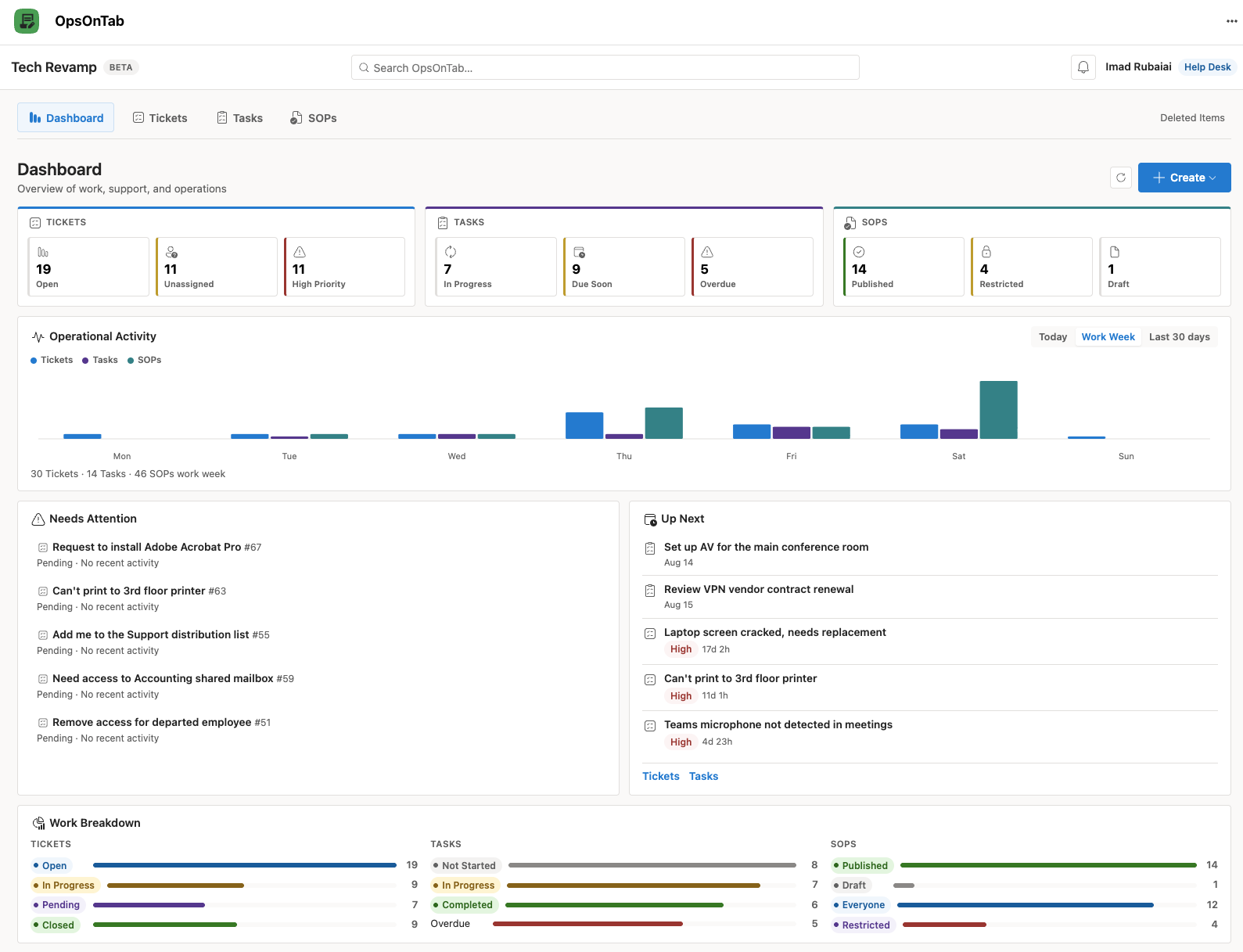
Operational work is often scattered across email, chats, spreadsheets, ticket systems, and undocumented procedures. Ownership becomes unclear, and teams lose track of what needs to happen next.
Create work, assign it, add Viewers, follow repeatable SOPs, request Approvals, create linked Tickets, and track progress in one connected platform.
Capture requests across the business and hand work to the right person, with clear status, priority, collaboration, and history.
Coordinate collaborative work with clear ownership, participants, Viewers, due dates, status, comments, and a complete activity history.
Break work into ordered Steps and keep multi-person workflows moving with ownership, progress, and history at each stage.
Turn repeatable procedures into reusable operational workflows with controlled audiences, structured content, revision history, and review and Approval.
Route decisions to the right Approver and keep an auditable history of the request, decision, and outcome.
Use My Work and Company views to understand workload, trends, bottlenecks, and progress without broadening access to the underlying records.
OpsOnTab is designed to help work move from a request through execution, Approval, and improvement without losing the context behind it.
Capture an issue, request, or operational need.
Define the Requester, Assigned To, participants, Viewers, and expected outcomes.
Use Tasks, Processes, phases, and Steps to get the work done.
Turn repeatable knowledge into governed SOPs and processes.
Apply structured approaches such as DMAIC, DMADV, and PDCA.
Keep the activity and decisions that explain what happened.
OpsOnTab uses Microsoft identity and directory context to help users find and assign the right people throughout the application.
Tickets and Tasks retain comments, assignment changes, status transitions, timestamps, notes, and other important activity so the history stays with the work.
My Work reflects the records you are connected to. Company provides organization-wide aggregate operational reporting without automatically granting access to every record.
IT, HR, Operations, Finance, Facilities, Software, and cross-functional teams all manage requests, Tasks, repeatable Processes, Approvals, and procedures.
OpsOnTab gives that work a shared operational structure inside Microsoft Teams.
OpsOnTab is currently in private preview while we validate the product, deployment experience, security model, and real-world workflows with Microsoft 365 users and organizations.
We're looking for organizations and Microsoft 365 users who want a more connected way to manage Tickets, Tasks, SOPs, Processes, Approvals, and Reports inside Teams.
Request Early AccessPreview availability is limited. Features, licensing, deployment options, and commercial terms may change before general availability.
People see and act on the items they are involved in, while Viewers, Approvers, and published SOP audiences receive only the access they need.
A person can access a record because they are connected to it as its creator or Requester, Assigned To or participant, Viewer, Approver, or part of a published SOP audience.
Users authenticate through their existing Microsoft identity rather than a separate OpsOnTab credential store.
OpsOnTab operates in the context of the organization's Microsoft environment and validates authenticated users before exposing protected application data.
Access is based on each person's relationship to the record, so involvement stays clear without complicated role administration.
Protected operations are validated by backend APIs instead of relying only on frontend visibility controls.
Microsoft Graph supports identity and directory capabilities used by the application, with permissions aligned to the released application configuration.
OpsOnTab does not require employees to create or manage another application password.
Details about OpsOnTab, Microsoft 365 integration, access, and the private preview.