Private Preview · Built for Microsoft Teams

Turn everyday work into a clear,
repeatable process.
Right inside Microsoft Teams.

OpsOnTab brings Tickets, Tasks, SOPs, Processes, Approvals, and Reports together so work moves from request to completion inside Microsoft Teams.
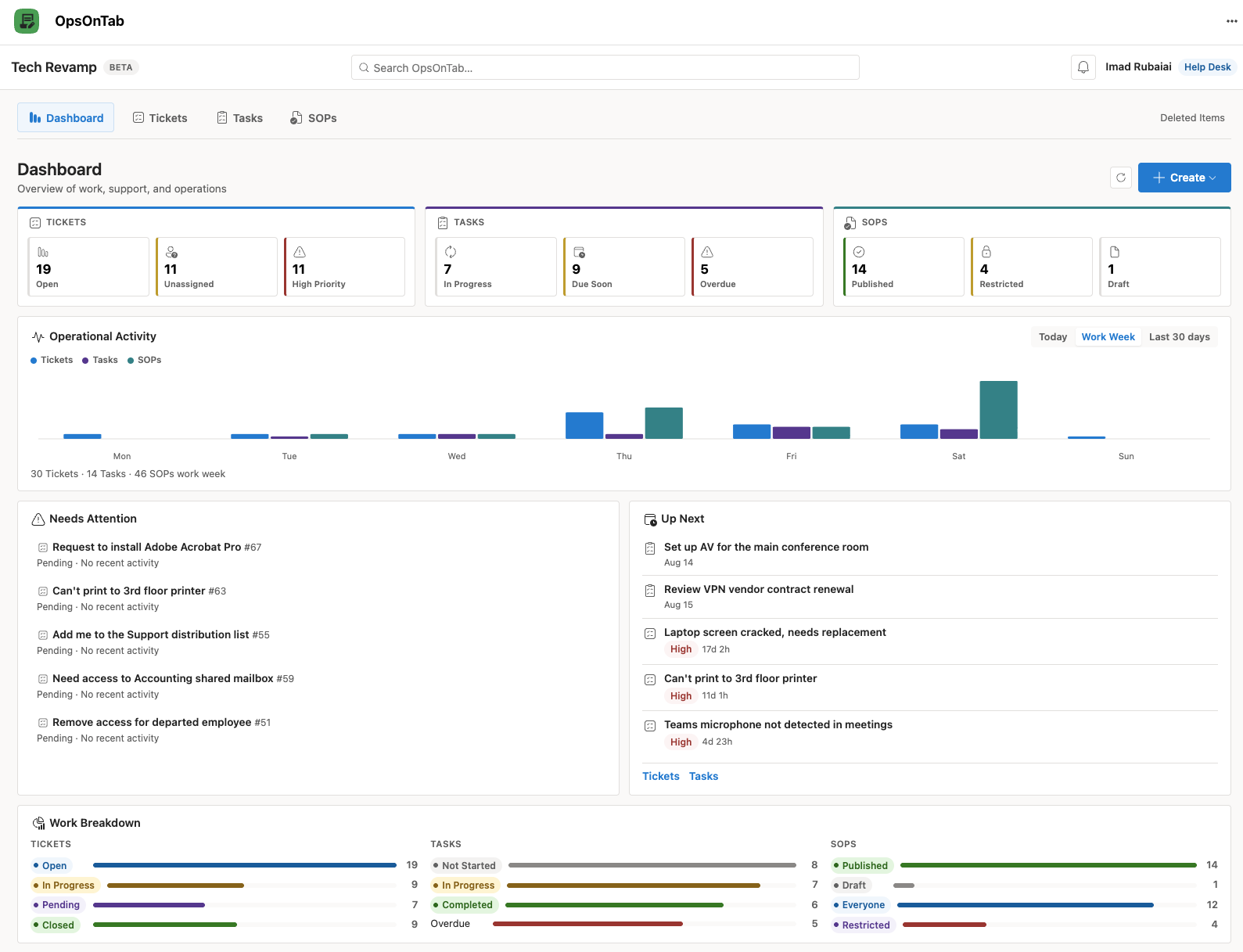
OpsOnTab is currently being validated with a limited group of Microsoft 365 users and organizations.
OpsOnTab app screenshot
One Connected Work System

Stop managing operational work across disconnected tools.

Operational work is often scattered across email, chats, spreadsheets, ticket systems, and undocumented procedures. Ownership becomes unclear, and teams lose track of what needs to happen next.

Disconnected Work

  • ✕ SOPs stored in documents with little connection to day-to-day work
  • ✕ Tasks spread across chats, email, spreadsheets, and project tools
  • ✕ Tickets disconnected from the work and procedures around them
  • ✕ Process execution tracked manually or inconsistently
  • ✕ Important history becomes difficult to reconstruct later

Connected Work with OpsOnTab

  • ✓ Tickets, Tasks, SOPs, Processes, Approvals, and Reports in one Microsoft Teams application
  • ✓ Structured workflows with clear ownership and progress
  • ✓ Move work from request to completion with clear ownership and visibility
  • ✓ Preserve assignments, status changes, comments, completion, and history
  • ✓ Search operational records instead of hunting through disconnected tools
Tickets, Tasks, SOPs, Processes, Approvals & Reports

From requests to repeatable work, all inside Microsoft Teams.

Create work, assign it, add Viewers, follow repeatable SOPs, request Approvals, create linked Tickets, and track progress in one connected platform.

Tickets

Capture requests across the business and hand work to the right person, with clear status, priority, collaboration, and history.

Tasks

Coordinate collaborative work with clear ownership, participants, Viewers, due dates, status, comments, and a complete activity history.

Processes

Break work into ordered Steps and keep multi-person workflows moving with ownership, progress, and history at each stage.

SOPs

Turn repeatable procedures into reusable operational workflows with controlled audiences, structured content, revision history, and review and Approval.

Approvals

Route decisions to the right Approver and keep an auditable history of the request, decision, and outcome.

Reports

Use My Work and Company views to understand workload, trends, bottlenecks, and progress without broadening access to the underlying records.

Connected Operational Flow

Keep requests, work, procedures, decisions, and progress connected.

OpsOnTab is designed to help work move from a request through execution, Approval, and improvement without losing the context behind it.

1. Request

Capture an issue, request, or operational need.

2. Organize

Define the Requester, Assigned To, participants, Viewers, and expected outcomes.

3. Execute

Use Tasks, Processes, phases, and Steps to get the work done.

4. Standardize

Turn repeatable knowledge into governed SOPs and processes.

5. Improve

Apply structured approaches such as DMAIC, DMADV, and PDCA.

6. Remember

Keep the activity and decisions that explain what happened.

Microsoft 365 Directory

Find people from your organization without maintaining another employee directory.

OpsOnTab uses Microsoft identity and directory context to help users find and assign the right people throughout the application.

  • ✓ Microsoft Entra ID authentication
  • ✓ Microsoft 365 directory-based people lookup
  • ✓ No separate OpsOnTab password database
Dav|
DM
David Miller
Operations Specialist
DA
David Adams
Cloud Operations
Complete Context

Keep the work record instead of reconstructing it later.

Tickets and Tasks retain comments, assignment changes, status transitions, timestamps, notes, and other important activity so the history stays with the work.

  • ✓ Timestamped activity history
  • ✓ Clear assignment and status changes
  • ✓ Deleted and restored records remain traceable where permitted
Ticket #1082 MacBook Outlook Authentication
In Progress
Priority High
Category Software
Assignee David Miller
Updated 24 Minutes
Sarah Jenkins • 24m ago
Outlook keeps prompting me to sign in after restarting the MacBook.
🔒 INTERNAL NOTE
Reviewed sign-in behavior and documented troubleshooting activity for follow-up.
Reports · My Work | Company

See workload, trends, bottlenecks, and progress.

My Work reflects the records you are connected to. Company provides organization-wide aggregate operational reporting without automatically granting access to every record.

14
Open Tickets
3
Unassigned
8
In Progress
3
Pending
2
High Priority
11
Closed Today

Ticket Trend — Work Week

Mon
Tue
Wed
Thu
Fri
Sat
Sun
Today Work Week Last 30 Days

Workload by Assigned To

David Miller 6 Tickets
Alex Chen 4 Tickets
Unassigned 3 Tickets
Work Across Teams

Built for work that crosses teams.

IT, HR, Operations, Finance, Facilities, Software, and cross-functional teams all manage requests, Tasks, repeatable Processes, Approvals, and procedures.

OpsOnTab gives that work a shared operational structure inside Microsoft Teams.

IT
Operations
Software
Cross-Functional
HR & Onboarding
Facilities
Finance
Compliance
Private Preview

Help shape how operational work gets done in Microsoft Teams.

OpsOnTab is currently in private preview while we validate the product, deployment experience, security model, and real-world workflows with Microsoft 365 users and organizations.

Limited Preview

Interested in OpsOnTab?

We're looking for organizations and Microsoft 365 users who want a more connected way to manage Tickets, Tasks, SOPs, Processes, Approvals, and Reports inside Teams.

Request Early Access

Preview availability is limited. Features, licensing, deployment options, and commercial terms may change before general availability.

Relationship-Based Access Control

Access follows the work.

People see and act on the items they are involved in, while Viewers, Approvers, and published SOP audiences receive only the access they need.

Microsoft establishes identity. Relationships determine access to the work.

A person can access a record because they are connected to it as its creator or Requester, Assigned To or participant, Viewer, Approver, or part of a published SOP audience.

Microsoft Entra ID Authentication

Users authenticate through their existing Microsoft identity rather than a separate OpsOnTab credential store.

Tenant-Aware Identity

OpsOnTab operates in the context of the organization's Microsoft environment and validates authenticated users before exposing protected application data.

Relationship-Based Access

Access is based on each person's relationship to the record, so involvement stays clear without complicated role administration.

Server-Side Authorization

Protected operations are validated by backend APIs instead of relying only on frontend visibility controls.

Microsoft Graph Integration

Microsoft Graph supports identity and directory capabilities used by the application, with permissions aligned to the released application configuration.

No Separate Password Database

OpsOnTab does not require employees to create or manage another application password.

Common Questions

Frequently Asked Questions

Details about OpsOnTab, Microsoft 365 integration, access, and the private preview.
Yes. OpsOnTab is designed to run as a Microsoft Teams application and provides its operational workspace directly within Teams.
No. OpsOnTab uses the organization's Microsoft identity through Microsoft Entra ID rather than requiring another employee username and password.
No. Access follows the work. A person sees a record because they have a relationship to it, such as creator or Requester, Assigned To or participant, Viewer, Approver, or published SOP audience. Company Reports show aggregate operational information without automatically opening access to every underlying record.
Task visibility is intentionally controlled. Access follows a person's relationship to the Task, including its creator or Requester, Assigned To, participants, Viewers, and Approver where applicable.
OpsOnTab supports Basic processes along with structured approaches such as DMAIC, DMADV, PDCA, and custom phase-and-Step workflows.
SOPs turn repeatable procedures into reusable operational workflows with a controlled published audience, structured content, revision history, and review and Approval.
OpsOnTab licensing is planned as an organization (tenant-level) license rather than per-user licensing, so adding employees to operational work isn't gated by individual seat costs. Final commercial terms are still being validated ahead of general availability.
Yes, through a layered security model. Microsoft Entra ID and Microsoft 365 first determine whether a guest has an active identity and access to your organization's environment, and OpsOnTab separately determines which specific Tickets, Tasks, Processes, or other records that person is authorized to work on. Guest participants are clearly labeled as external in the interface, and once their involvement ends they may retain read-only access to records they actually participated in, subject to your organization's access policies — guests never gain general visibility into company records simply by being a tenant guest.
OpsOnTab requires Microsoft identity and sign-in capabilities to authenticate users, plus the Microsoft Graph and directory permissions needed to support released functionality — following a least-privilege approach rather than requesting broad access upfront. The final production permission list is still being validated ahead of general availability.
Submit an early access request through the OpsOnTab Private Preview form. Preview availability is limited while the product is being validated.